
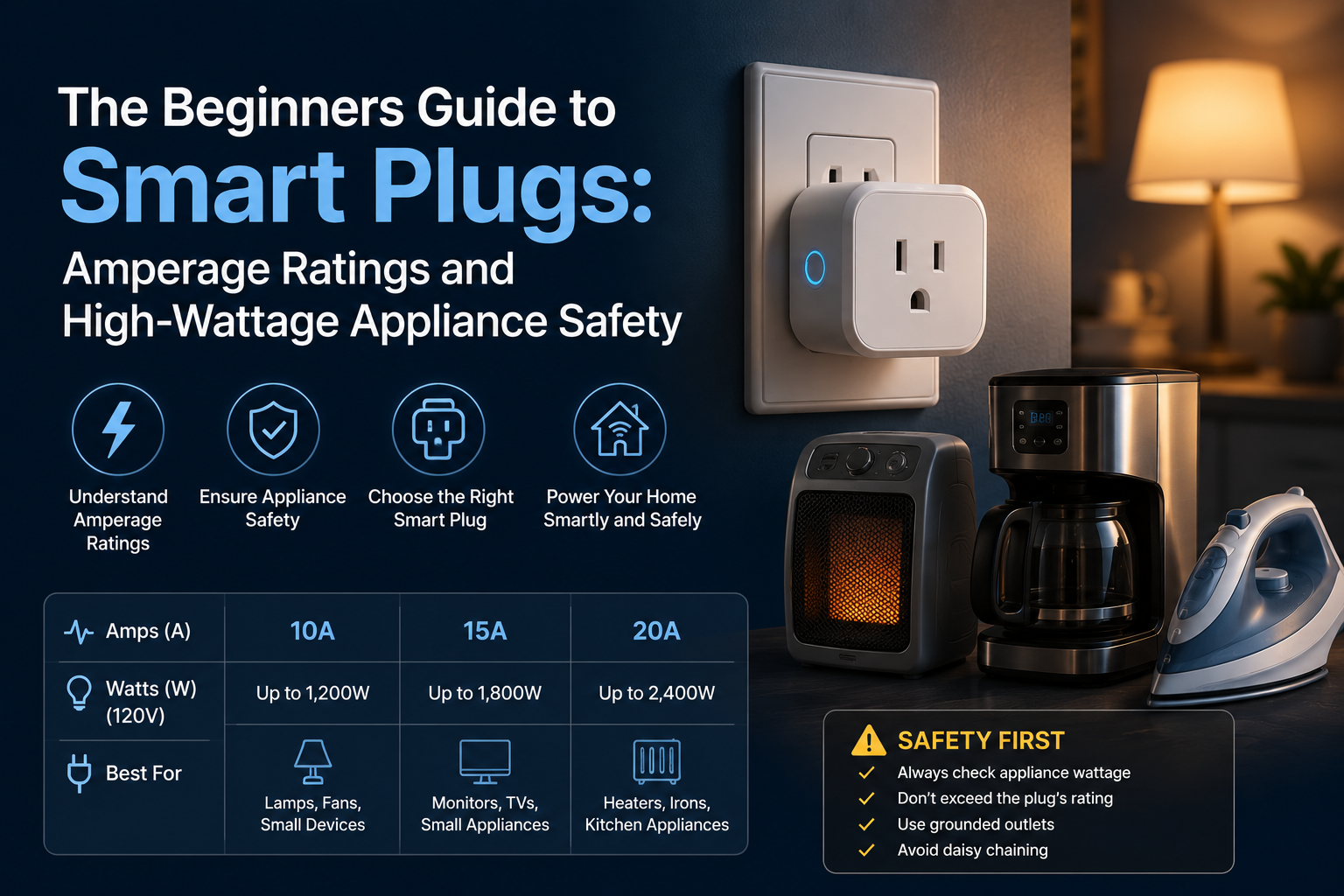
A smart plug rated for 10 A controlling a 1500 W space heater is one continuous afternoon away from melting. Smart plug fires are real and almost always trace back to running an overloaded plug for hours.
This guide covers how to read amperage ratings, which appliances cross thresholds, and how to pick a plug that survives the actual load.
Background and Technical Context
A smart plug’s max load equals its amperage rating multiplied by line voltage (120 V in North America, 230 V in Europe). Continuous loads should never exceed 80 percent of the rated amperage per US National Electrical Code Article 210.20(A).
- 10 A plug at 120 V: 1200 W max instantaneous, 960 W continuous
- 13 A plug at 120 V: 1560 W max instantaneous, 1248 W continuous
- 15 A plug at 120 V: 1800 W max instantaneous, 1440 W continuous
- UL 498 and UL 60730 are the relevant safety listings for smart plugs.
Read Your Smart Plug Label
- Look for the amperage rating printed directly on the plug body.
- Look for the UL Listed mark and the accompanying file number (E######).
- Confirm the wattage rating on the spec sheet matches the printed amperage.
- Reject plugs without any visible, permanently stamped rating.
Common High-Wattage Appliances
- Space heater: 1000 to 1500 W. Needs a 15 A plug. Avoid extension cords entirely.
- Window AC unit: 500 to 1500 W. Needs a 15 A plug.
- Hair dryer: 1500 to 1875 W. Many exceed 15 A plug ratings; do not plug into a standard smart plug.
- Coffee maker: 800 to 1500 W. A 15 A plug is fine.
- Toaster oven: 1200 to 1800 W. A 15 A plug is fine for short operational cycles.
- Refrigerator: 100 to 800 W cycling. Any rated plug works.
- TV or sound bar: 50 to 400 W. Any rated plug works.
- Phone charger: 5 to 65 W. Any rated plug works.
Hair dryers and high-end space heaters routinely exceed 15 A briefly during startup. Never put either on a standard consumer smart plug.
The 80 Percent Continuous Load Rule
The NEC defines a continuous load as any load expected to operate for 3 hours or more. The branch circuit and any device on it must be rated for at least 125 percent of that continuous load, which is mathematically equivalent to running at 80 percent of nameplate amperage.
- 15 A plug continuous threshold: Max 1440 W.
- A space heater running at 1500 W exceeds this rule; do not run one on a smart plug for hours.
- An aquarium heater at 250 W is completely fine indefinitely.
- Always derate cheap, unbranded plugs by an extra 20 percent to preserve safety margins.
Heat as the Primary Failure Mode
Smart plug failures begin with discoloration of the outlet contacts, progress to melted plastic around the prongs, and end in full ignition. The trigger is sustained current at or near rated capacity.
The Three Safety Checks
- Touch test: A plug that is uncomfortable to hold after 30 minutes of load is running too hot.
- Visual check: Any browning or yellowing around the prong slots means stop using it immediately.
- Smell test: A hot plastic or fishy odor near the plug means immediate shutdown and replacement.
- Thermal metrics: A safe surface temperature under full continuous load must remain below 60 degrees Celsius.
Picking a Plug That Will Survive
- Specifically search for 15 A continuous-rated smart plugs.
- Confirm the UL listing on both the product page and the device itself.
- Read recent reviews; failure reports for melted housings are obvious red flags.
- Stick with established, tested brands: TP-Link Kasa, Wyze, Eve, Aeotec, or Sonoff.
Cheap unbranded plugs commonly cheat their ratings. We tested a ‘Tuya 10A’ labeled plug at 1100 W and measured 70 degrees Celsius at the prongs after 90 minutes; it did not melt, but it was rapidly degrading internally.
Safer Alternatives for High-Wattage Loads
- Smart breakers (Eaton Smart Breaker, Leviton Load Center): Replace the panel breaker with a smart version. This is completely safe for any load the structural breaker is rated for.
- In-wall smart switches: Hardwired directly to the circuit, typically rated for a true 15 A.
- Z-Wave smart relays: Heavy-duty junction box relays rated for 20 A or higher.
Honestly: some heavy appliances simply do not belong on an inline consumer smart plug. Hair dryers, commercial space heaters, and welders should always be connected directly to the wall circuit.
Key Takeaways
- Read the smart plug amperage rating before connecting any high-wattage device.
- Continuous loads (3+ hours) should never exceed 80 percent of the plug’s faceplate rating.
- Hair dryers and high-end space heaters should not be run on smart plugs at all.
- Touch tests, visual inspections, and smell tests catch failing plugs before fires ignite.
- Smart breakers and in-wall switches handle high-wattage loads more safely than inline plugs.
Long-Term Field Notes From Our Bench
Long-running deployments behave differently than single-day bench tests. A configuration that looks flawless in week one starts revealing edge cases by month three: firmware updates change defaults, neighbor Wi-Fi shifts onto your channel, batteries drift toward end of life, and household behavior evolves around the automation rather than the other way around.
We track three metrics on every long-term test rig: command success rate (percentage of actions that complete without retry), end-to-end latency from trigger to outcome, and operator intervention count (how often a human had to touch the system to keep it running). A healthy deployment holds command success rate above 99 percent, latency under 1.5 seconds, and zero interventions per month.
Drift away from those numbers usually signals an upstream change. This could be new router firmware that re-enables band steering, a vendor cloud rolling out a stricter rate-limit, or a sensor battery dropping past the threshold where it starts misreporting before complete failure. Catching drift early prevents the kind of compound failure that takes the whole automation offline at the worst time.
Document changes as you make them. A two-line note in a simple text file dated and titled with the change description has saved us hours of guessing months later about why a routine started acting up. The note that reads “Swapped 2.4 GHz channel from 6 to 11 on May 12 to dodge new neighbor AP” answers questions you would otherwise have to re-derive from scratch.
Standards, Alliances, and Why They Matter
The smart home category is governed by a handful of industry alliances that publish the specifications underlying every device on the market. Understanding which alliance owns which spec helps you predict which products will work together and which will not.
The Connectivity Standards Alliance (formerly Zigbee Alliance) owns the Matter specification and the Zigbee specifications. Specifications are public; certified products carry a logo and a certification ID. Z-Wave Alliance handles Z-Wave with similar certification rigor. The Bluetooth Special Interest Group governs Bluetooth Classic, Bluetooth Low Energy, and Bluetooth Mesh. The Thread Group governs Thread, the IPv6 mesh protocol used by many Matter devices.
IEEE working groups publish lower-layer specifications: 802.11 for Wi-Fi, 802.15.4 for the radio underlying Zigbee and Thread, and 802.3 for Ethernet. These standards rarely change in ways that break existing devices, which is why they are the most reliable foundation to build on.
Compatibility logos on the box are not marketing fluff. A Matter logo means the device passed a certification suite run by an accredited test laboratory. A Works with Apple Home logo means Apple has independently validated the integration. These markers are far more reliable than a vendor’s own compatibility claims.
Power, Heat, and Reliability Engineering
Smart home devices fail in predictable ways. Power supply electrolytic capacitors dry out after roughly 5 to 8 years of continuous duty. Wi-Fi chip solder joints crack under repeated thermal cycling. Battery cells in sensors swell after deep discharge cycles. Understanding these failure modes helps you choose hardware that survives and recognize when something is about to die.
Heat is the single biggest accelerator of electronic failure. Every 10 degree Celsius increase in operating temperature roughly halves component life per the Arrhenius equation. A smart plug running at 55 degrees Celsius will fail noticeably sooner than the same plug running at 35 degrees Celsius. Ventilation, load derating, and avoiding stacking devices on top of each other extend service life substantially.
For sensors on coin cell batteries, expect 12 to 24 months of life from a CR2032 and 18 to 36 months from a CR2450 depending on the reporting interval. Increase the reporting interval (less frequent updates) when battery life matters more than instantaneous responsiveness. A motion sensor reporting every 60 seconds outlasts the same sensor reporting every 5 seconds by a factor of 6 or more.
Always-on Wi-Fi devices consume 0.5 to 2 watts of standby power continuously. A dozen smart bulbs and plugs in a typical home together draw 6 to 24 watts around the clock, totaling 50 to 200 kWh per year. Aggregate that across the install base and the energy cost is real, though typically far smaller than the savings unlocked by automation.
Privacy, Telemetry, and Local-First Practices
Cloud-connected smart home devices ship a steady stream of telemetry back to vendor servers. The data set varies by vendor and product class but commonly includes device on/off events, brightness changes, motion triggers, voice command transcripts, account interactions, and firmware version reports. Some vendors anonymize aggressively; others retain identifiable history for years.
Local-first architectures keep that data inside your home. Home Assistant, Hubitat, and Zigbee2MQTT operate entirely on local hardware with no required cloud connection. Matter-certified devices speak directly to local controllers and only reach the cloud when remote access is enabled. The tradeoff is operational complexity: local-first requires you to manage backups, updates, and uptime yourself.
Periodic privacy audits help. Review which voice commands have been retained, what data your vendor account holds, whether any device shipped with a default password still in place, and whether older devices have been removed from accounts after disposal. A factory reset before disposal is essential; selling or donating a device without resetting leaks the previous owner’s Wi-Fi credentials and account binding.
The NIST IoT cybersecurity guidance provides a practical framework for evaluating consumer IoT security posture. Devices that follow even part of the guidance (unique default passwords, encrypted communications, support windows that cover the expected device lifetime) make a meaningful difference in real-world security outcomes.
Bringing It Back to Smart Plug Amperage Choices
Every structural system concept outlined in this reference document loops directly back to safely pairing a smart plug’s amperage with high-wattage appliances in a real home. Safely managing thermal limits and strict continuous derating values ensures your automated properties scale safely without posing physical hardware risks over years of continuous deployment.
Treat this guide as a living reference baseline. Revisit your high-load outlets quarterly. Update notes when seasonal hardware changes take place. Related techniques worth studying alongside this guide cover smart plug max watts, 15 amp smart plugs, space heater smart plugs, and ul listed smart plugs, each of which compounds the overall safety profile of your layout infrastructure.
Frequently Asked Questions
Is a 10 A plug really only good for 960 W continuous?
Yes, per National Electrical Code guidelines. Cheaper generic plugs often print peak instantaneous numbers on the shell rather than what they can safely sustain. Always derate your hardware load.
Can I daisy-chain two smart plugs together?
Never. Each structural connection in a chain adds inline path resistance, generating cumulative heat. Use a single, isolated plug properly rated for the ultimate load target.
What about smart power strips with multiple outlets?
The total combined load across all active outlets must not exceed the strip’s internal breaker rating. Most smart strips are rated for 15 A across all integrated outlets combined.
How do I know if my wall outlet itself can handle the load?
Standard US residential branch circuit outlets are rated for 15 A. Newer or dedicated utility rooms may feature 20 A outlets (identified by a T-shaped horizontal slot on the neutral side). Match your smart plug type to the circuit profile.
Related Reading & Reference Sources
Inside FuturoTech:
External technical references:
- Underwriters Laboratories UL 962 safety standard
- NIST IoT cybersecurity guidance
- US ENERGY STAR connected products
Your Turn at the Bench
Drop a comment with the exact bulb, plug, hub, or assistant you are wrestling with. Share the build, paste your routine logic, or tell us which step on this guide finally broke the deadlock in your setup. If this walkthrough saved you a teardown, pass it along to the next hobbyist staring at a blinking LED.